透過網站操作 TSC TTP-345 標籤機,按下按鈕後直接列印 ( 不透過瀏覽器的列印工具 )
12 Mar 2021
印表機控制語言(Printer Language)
每一種印表機都有它的控制語言(Printer Language),大家最常聽到的像
- ESC指令集(屬EPSON公司)
- PCL語言(HP公司)
條碼列印機也有自己的語言…
- ZPL(Zebra公司)
- EPL(Eltron公司)
- EZPL(Godex公司)
- TSPL(TSC公司)
第一步:先在 windows 用純 python 去驅動測試,並調整列印位置,由於標籤紙都被我試印完了,所以重新捲回去再印一次….

直接在該目錄執行 python 的腳本
import ctypes
mydll = ctypes.windll.LoadLibrary('.//TSCLIB.dll')
if __name__ == '__main__':
pass
a_str = "HELLO WORLD";
print(a_str);
mydll.openport("TSC TTP-345")
'''mydll.setup("100","100","2","10","0","0","0")'''
mydll.sendcommand("SIZE 65 mm, 45 mm");
mydll.sendcommand("GAP 3 mm, 0 mm");
mydll.sendcommand("DIRECTION 1");
mydll.sendcommand("CLS");
mydll.barcode("200","200","128","110","1","0","4","3","2018-12-0783667");
mydll.printlabel("1","1");
mydll.closeport();
正常來講…
有讀到 TSCLIB.dll 加上 TSPL 印列表列印程式語言正確的話,就可以列印了
第二步:將 python 腳本修改成由 php 來執行
在 apache 下建立 tsc.php 由 php 來執行 python 腳本
$command = escapeshellcmd('C:\Apache24\htdocs\tsc\printer.py');
$output = shell_exec($command);
放在 apache 下時,將 TSCLIB.dll 的路徑改為絕對路徑,如果出錯看 apache error log 會有說明
import ctypes
#mydll = ctypes.windll.LoadLibrary('.//TSCLIB.dll')
mydll = ctypes.windll.LoadLibrary('C:\\Apache24\\htdocs\\tsc\\TSCLIB.dll')
if __name__ == '__main__':
pass
a_str = "HELLO WORLD";
print(a_str);
mydll.openport("TSC TTP-345")
'''mydll.setup("100","100","2","10","0","0","0")'''
mydll.sendcommand("SIZE 65 mm, 45 mm");
mydll.sendcommand("GAP 3 mm, 0 mm");
mydll.sendcommand("DIRECTION 1");
mydll.sendcommand("CLS");
mydll.barcode("200","200","128","110","1","0","4","3","2018-12-0783667");
mydll.printlabel("1","1");
mydll.closeport();
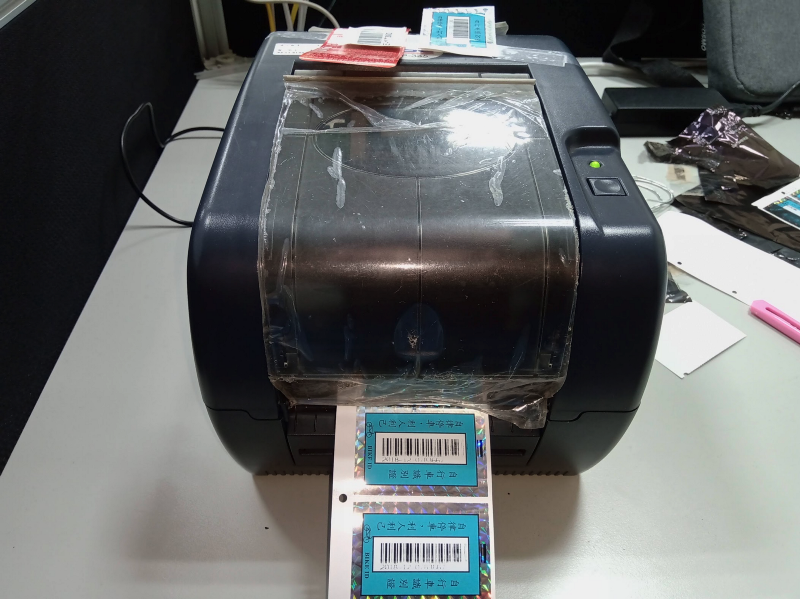
執行它,印表機會開始列印

第三步:由純 html 頁面透過 ajax 去呼叫 php,再由 php 去執行 python
實際流程,應該是在這一個動作加入資料傳送,再由 php 接收,送到 python 腳本,由 python 執行 dll 檔,列印出條碼
<!DOCTYPE html>
<html>
<head>
<meta charset="UTF-8">
<title>Tsc Printer Demo</title>

<script src="https://code.jquery.com/jquery-3.3.1.js"
        integrity="sha256-2Kok7MbOyxpgUVvAk/HJ2jigOSYS2auK4Pfzbm7uH60="
        crossorigin="anonymous"></script>
<script type="text/javascript">
$(document).ready(function(){
  $("button").click(function(){
    $.ajax({
      type: 'GET',
      url: 'tsc.php',
      success: function(data) {
        console.log('success');
      }
    });
  });
});
</script>

</head>
<body>
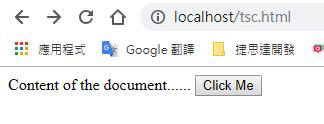
Content of the document......
<button type="button">Click Me</button>
</body>
</html>
執行 tsc.html,按下 Click Me 按鈕,印表機就會動了
回上一頁