安裝 Jekyll 靜態網站生成器 ( Ruby ) 時所遭遇到的問題
03 Mar 2021
按照官網安裝 Jekyll 靜態網站生成器 ( Ruby )
按照官網安裝 Jekyll 靜態網站生成器 ( Ruby )
執行
bundle exec jekyll serve —-trace
出現錯誤訊息 cannot load such file — webrick (LoadError)
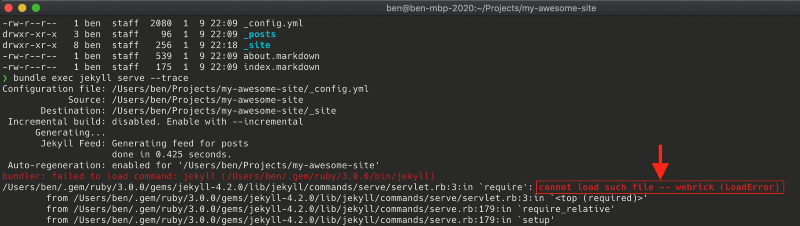
自己 Mac 的環境如下

最後有找到解決方式
jekyll/commands/serve/servlet.rb:3:in `require’: cannot load such file — webrick
裡面提到
Adding gem “webrick” to my Gemfile solves the problem, but Jekyll should include it in its gemspec.
在專案下的 Gemfile 檔案最後面加入 gem "webrick"
然後再重新執行一次
bundle exec jekyll serve --trace
成功

出現網站了

回上一頁